Project workflow
- URL INPUT
- MEDIA INSPECTION
- MODE / FORMAT
- QUEUE
- DOWNLOAD
- OUTPUT
SYSTEM S2
DESKTOP MEDIA DOWNLOAD / PROCESSING WORKFLOW
Desktop application for managing media download workflows, format selection, queues, retries and supported-site handling through a simple graphical interface.
SYSTEM IDENTITY
SYSTEM IDMEDIA-DL-S2
STATUSWORKING PROTOTYPE
TYPEDESKTOP / MEDIA PROCESSING
Desktop workflow for managing media downloads with format selection, queue handling and failure recovery.
01 / OVERVIEW
Command-line media tools are flexible, but manual workflows can become repetitive when handling URLs, formats, cookies, retries, output modes and failures.
Universal Media Downloader wraps the same workflow in a desktop interface and keeps the process explicit: selecting source, picking output strategy, routing queues and recovering failed tasks.
Project workflow
02 / USE CASES
UC-01
Use simple mode to move from a URL to a practical audio or video output.
UC-02
Inspect available formats and choose an explicit output profile in advanced mode.
UC-03
Keep several URLs and their execution state visible as separate queue items.
UC-04
Retry temporary failures or fall back when the preferred quality is unavailable.
UC-05
Use cookies for sessions where authenticated requests are required; DRM-protected content remains unsupported.
03 / INPUT & MODES
The input is URL-driven. Selection controls then decide media mode and operation depth.
Input and mode map
Audio stream extraction pipeline and target handling.
Video stream extraction pipeline and target handling.
Combined audio and video download mode.
Simplified quality and download profile selection.
Detailed profile with explicit controls for mode, format and output behavior.
04 / INTERFACE
A desktop workflow for media analysis, format selection, queued downloads and application-level configuration.
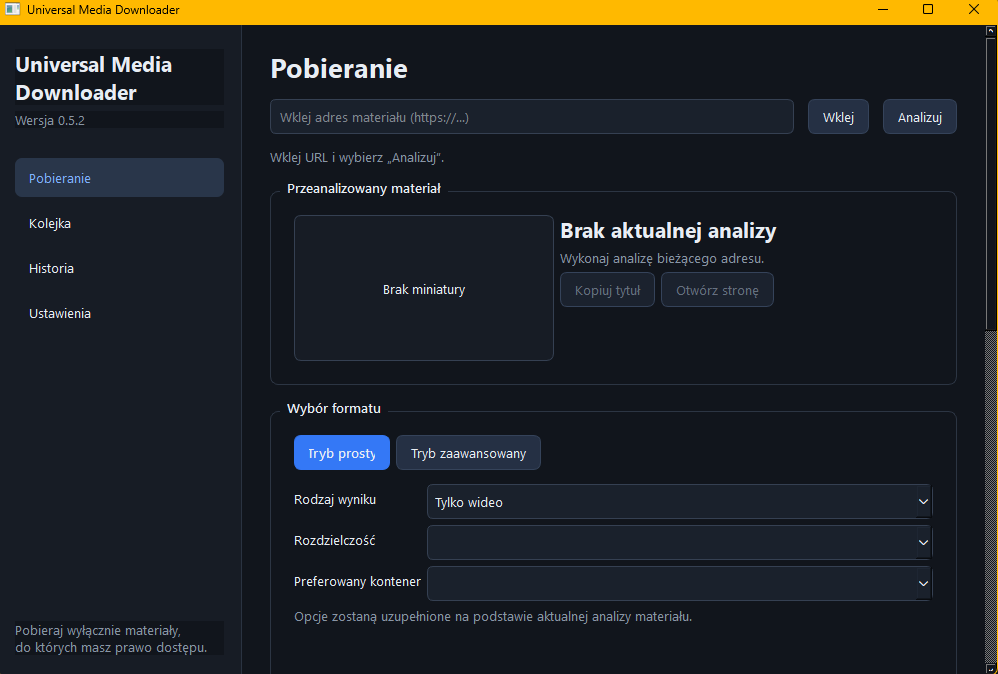
05 / FORMAT DISCOVERY
After URL validation the app inspects available formats, prepares a format list and lets the user select a suitable target.
Format selection chain
Optional format fallback
SIMPLE MODE
Uses profile defaults and quick quality selection.
ADVANCED MODE
Can apply a local fallback strategy when preferred format is unavailable.
06 / DOWNLOAD QUEUE
The queue keeps input URLs, format context and execution state visible as separate, manageable jobs.
Queue orchestration map
URL INPUT
Media URL input
FORMAT DISCOVERY
Inspect available streams and formats
QUEUE
Track multiple entries and active tasks
DOWNLOAD JOB
Dispatch by selected mode and profile
JOB 01
READY
JOB 02
WAITING
JOB 03
RETRY
07 / FAILURE RECOVERY
The runtime evaluates each DOWNLOAD ATTEMPT and routes it into recovery actions before moving forward.
DOWNLOAD ATTEMPT routing
SUCCESS
Downloaded item is moved to output flow and marked as completed.
RETRY
Transient failures trigger retry flow and keep the job in active queue.
QUALITY FALLBACK
If selected format is unavailable, fallback quality or compatible format is attempted.
AUTH / COOKIE REQUIRED
Cookies file support for sessions where authenticated requests are required.
UNSUPPORTED - this boundary is explicit in runtime handling.
08 / OUTPUT WORKFLOW
Completed jobs resolve to file results and optional overwrite policy checks when a target path already exists.
Output map
O-01
Output folder path and destination control.
O-02
Overwrite handling for existing files.
09 / TECH STACK
10 / STATUS
SYSTEM ID MEDIA-DL-S2
STATE WORKING PROTOTYPE
DEPTH DESKTOP MEDIA WORKFLOW
Desktop interface focused on queue management, format selection and resilient download handling.